How to Scrape Etsy Data Without Coding Using Apify
Imagine being able to analyze millions of Etsy listings, shops, prices, and customer reviews from one of the world’s largest online marketplaces. Etsy data can help sellers discover product opportunities, compare competitors, track pricing, and understand customer feedback. But collecting this information manually can take hours, especially when you need to monitor hundreds or thousands of listings.
The good news is that you do not need to build a complex scraper from scratch or write advanced code to collect Etsy data. With the right tools and workflow, you can collect publicly available Etsy data using both coding and no-code methods. In this guide, you will learn what Etsy data you can collect, how to scrape Etsy data without coding, and how to use a simple workflow to collect and organize product, shop, pricing, and review data.
What Is Etsy Web Scraping?
Etsy web scraping is the process of collecting publicly available data from Etsy in a structured format. This data can include product titles, prices, ratings, reviews, shop details, categories, and product URLs. Instead of manually copying information from hundreds or thousands of listings, a scraper can collect the data and organize it into formats such as CSV or JSON.
For e-commerce sellers, researchers, and businesses, Etsy data can provide useful insights into products, prices, competitors, and customer preferences. With the right tools, you can collect and analyze this information more efficiently than manual research.
Why Scrape Etsy Data?
Scraping Etsy data can make market research faster and help you make decisions based on real marketplace data. Manually checking thousands of listings takes significant time and becomes difficult when you need to track changes regularly. A structured data collection workflow allows you to gather the information you need and analyze it more efficiently.
Here are some common ways businesses and researchers use Etsy data:
-
Discover Product Opportunities: Analyze product listings, categories, prices, ratings, and other publicly available information to identify popular products and potential market opportunities.
-
Analyze Competitor Pricing: Compare product prices, shipping information, discounts, and other listing details to understand how different sellers position their products in the market.
-
Understand Customer Feedback: Collect publicly available reviews to identify common customer opinions, product strengths, and areas where buyers see room for improvement.
What Challenges Can You Face When Collecting Etsy Data?
Collecting data from large websites can become more complex as the amount of data increases. Websites may monitor unusual traffic patterns and limit requests that appear excessive or automated. This means a simple script may not always be suitable for collecting large amounts of data.
Common challenges can include:
-
Request Limits: Sending too many requests in a short period may result in temporary access restrictions.
-
Changing Website Structure: Website layouts and page structures can change over time, which may affect how a scraper collects information.
-
Large-Scale Data Collection: Collecting data from thousands of listings requires a reliable workflow that can manage requests and organize the results properly.
For this reason, many users choose managed scraping tools that handle much of the technical setup. This allows them to focus on collecting and analyzing Etsy data instead of building and maintaining a scraping system from scratch.
Quick Comparison: Which Etsy Scraping Method Is Best for You?
The best Etsy scraping method depends on your technical skills, the amount of data you need, and how often you plan to collect it. Some methods are ideal for quick, small-scale research, while others are better for collecting large amounts of data regularly.
The table below compares four common ways to collect Etsy data so you can choose the option that best fits your project, budget, and data needs.
| Scraping Method | Technical Skill Required | Best For | Key Tools |
|---|---|---|---|
| No-Code Cloud Scraping | None | Collecting Etsy product, shop, or search data without writing code | Apify, Browse AI, Octoparse |
| Browser Extensions | None | Quick, small-scale data collection directly from your browser | Web Scraper and similar browser tools |
| Custom Python Scripts | Intermediate to Advanced | Custom data collection workflows and advanced automation | Python, Requests, BeautifulSoup, Pandas, Selenium |
| Scraping APIs | Basic to Intermediate | Developers who need a managed solution for larger data collection projects | ScraperAPI, Bright Data, ZenRows |
How Do You Choose the Right Tool?
Start by asking yourself two simple questions: How much data do you need, and how often do you need it?
If you are an e-commerce seller who wants to research a few competitors or collect Etsy product data occasionally, a no-code cloud scraper or browser extension may be the easiest option. These tools require little technical knowledge and can help you collect data without building a scraper from scratch.
If you need to collect large amounts of Etsy data regularly, a custom Python scraper or scraping API may be a better choice. These options provide more flexibility and can support larger, repeatable data collection workflows.
For most beginners, a no-code scraping tool is the simplest place to start. You can collect the data you need without spending time learning programming or managing a complex technical setup.
The No-Coder’s Guide: How to Scrape Etsy Data Using Apify
You do not need to know Python or write code to collect useful Etsy data. While developers can build custom scraping scripts, e-commerce sellers, researchers, and businesses often need a faster way to collect structured marketplace data.
With a no-code scraping platform such as Apify, you can use ready-made tools called Actors to collect Etsy data without building a scraper from scratch. These tools allow you to collect information such as product listings, shop details, prices, and reviews through a simple online interface.
In this guide, you will learn how to choose an Etsy scraper, add your input, run the data collection process, and export your results as a CSV or Excel file.
The 3 Essential Etsy Scrapers to Use
Different Etsy research tasks require different types of data. The Get Data For Me collection on the Apify Store includes specialized scrapers for different use cases:
-
Etsy Product Search Scraper: Collect product information from Etsy search results, including product titles, prices, listing IDs, tags, shipping details, and image URLs.
-
Etsy Seller Info Scraper: Collect publicly available information about Etsy shops, such as shop details, seller information, listing counts, and other available store data.
-
Etsy Review Scraper: Collect publicly available customer reviews, ratings, review dates, and other review information from Etsy listings or shops.
Step-by-Step: How to Scrape Etsy Data with Apify
To get started, you need an Apify account and the Etsy URLs or search terms you want to research.
1. Create an Apify Account
Visit Apify and create an account. After signing up, you can access the Apify platform and browse available Actors for different data collection tasks.
2. Choose an Etsy Scraper
Search the Apify Store for the Etsy scraper that matches your goal. For example, you can choose the Etsy Product Search Scraper to collect product data or the Etsy Review Scraper to collect customer feedback.
Open the Actor page and click Try for free to access the input form.
3. Add Your Input
Open Etsy and find the search results, product, or shop you want to research. Copy the relevant URL and paste it into the required input field in the Apify Actor.
Depending on the scraper, you may also be able to enter search keywords, shop names, or other input options. You can set the maximum number of items you want to collect based on your research needs.
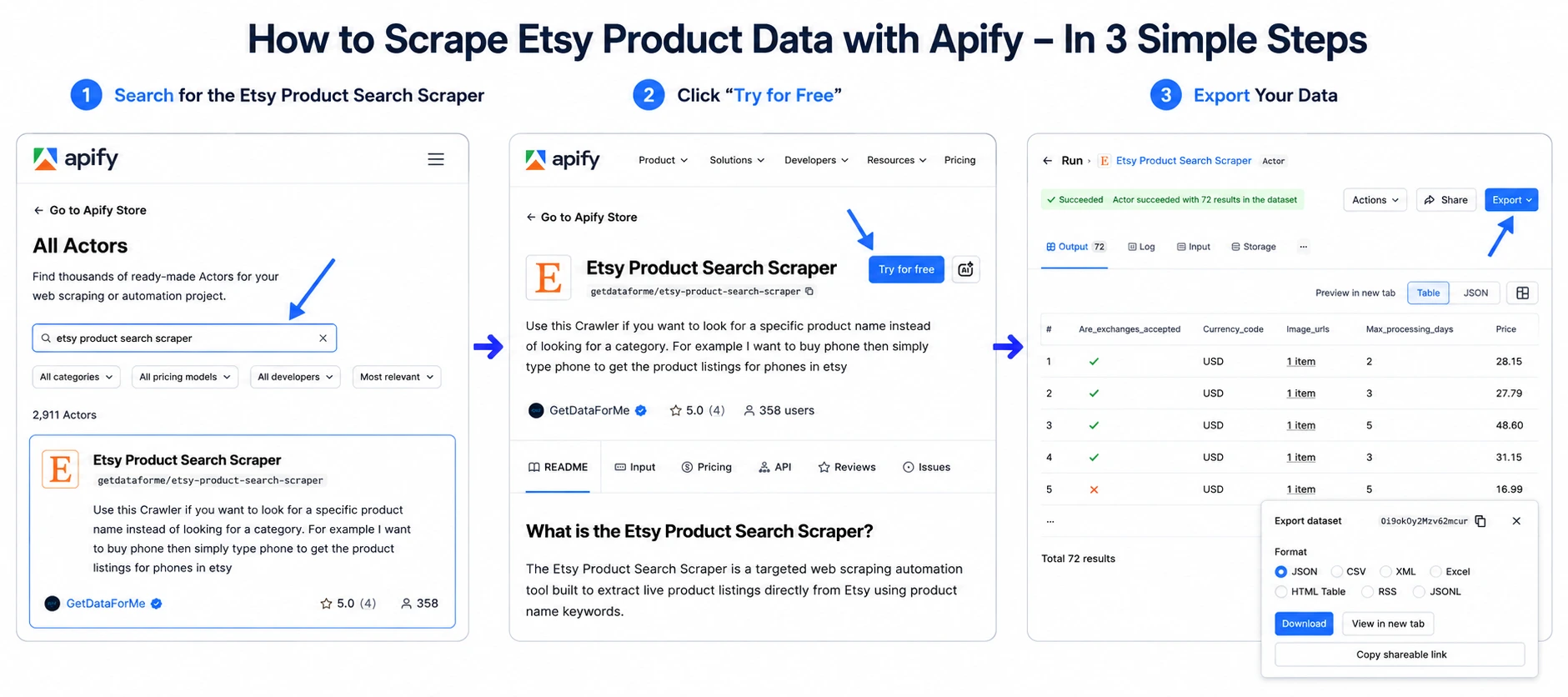
4. Run the Scraper and Export Your Data
After adding your input, click Start to begin the data collection process. Once the run is complete, you can review the results in the dataset.
You can then export your data in formats such as CSV, Excel, or JSON, depending on how you plan to use it.
Bonus: Send Etsy Data to Google Sheets
You can also connect your data collection workflow to tools such as Google Sheets, Zapier, or Make.
For example, you can create a workflow that sends newly collected Etsy data to a spreadsheet. This can help you organize product research, compare prices, monitor shops, or analyze customer reviews more efficiently.
Instead of manually copying information from Etsy, you can create a repeatable workflow for collecting and organizing the data you need.
Common Challenges When Scraping Etsy Data
Collecting Etsy data at scale can be more difficult than manually browsing the website. When you need information from hundreds or thousands of listings, you may need to deal with request limits, changing page structures, and other technical challenges.
This is one reason many non-technical users choose managed no-code scraping platforms. Instead of building and maintaining a scraping system from scratch, these platforms provide ready-made tools that handle much of the technical setup behind the scenes.
How No-Code Scraping Platforms Simplify Data Collection
No-code platforms make the scraping process easier by handling several technical tasks for you:
-
Managed Data Collection: The platform manages the technical process of collecting information from the pages you provide, so you do not need to build every part of the system yourself.
-
Structured Data Extraction: Instead of manually copying information from web pages, scraping tools can organize collected data into structured fields such as product names, prices, ratings, shop details, and reviews.
-
Scalable Workflows: If you need to collect information from many pages, a managed platform can help you create a repeatable data collection workflow instead of handling each page manually.
-
Data Export: After the collection process is complete, you can review and export your results in formats such as CSV, Excel, or JSON.
By handling much of the technical setup, no-code scraping platforms allow you to focus on the information you actually need. You can collect, organize, and analyze Etsy data without spending time building a complex scraping system from scratch.
Business Value: How Etsy Data Can Help Sellers Make Better Decisions
Collecting Etsy data is only the first step. The real value comes from how you use that information to understand your market, improve your products, and make better business decisions.
By organizing publicly available Etsy data into a structured format, sellers can compare products, study competitors, analyze customer feedback, and identify market opportunities. Instead of relying only on guesswork, you can use marketplace data to support your pricing, product research, and marketing decisions.
Here are four practical ways Etsy data can help grow your business.
Compare Prices and Improve Your Pricing Strategy
Pricing your products can be difficult when you do not know what similar products are selling for. Collecting product and pricing data from similar Etsy listings can help you understand the price range within your market.
You can compare prices across different products, shops, categories, and product features. This information can help you identify whether your prices are significantly higher or lower than similar listings.
Pricing should still consider your own costs, materials, shipping, and profit margins. However, competitor pricing data can give you a clearer view of the market and help you make more informed pricing decisions.
Research Competitor Listings and Keywords
Studying successful Etsy listings can help you understand how sellers present their products. You can analyze publicly available information such as product titles, descriptions, categories, tags, and other listing details.
This research can help you identify common terms and topics used within your product category. You can then use these insights to improve your own product listings while keeping your content original and relevant to your products.
Instead of researching each listing manually, structured Etsy data can make it easier to compare many listings and identify common patterns.
Identify Product and Market Opportunities
Etsy data can also help you understand which products and categories are receiving attention in the marketplace. By comparing listings, prices, ratings, reviews, and other available information, you can identify potential product opportunities.
For example, you may notice that:
- A product category has many popular listings
- Certain product features appear frequently in highly rated products
- Some categories have fewer competing listings
- Buyers frequently request features that are not widely available
These insights can help you research new product ideas and understand what customers may be looking for.
Use Customer Reviews to Improve Your Products
Customer reviews can provide valuable information about what buyers like and dislike about products. By analyzing publicly available reviews, you can identify recurring feedback and common customer concerns.
For example, customers may frequently mention:
- Product quality
- Size or fit
- Packaging
- Shipping experience
- Material quality
- Product durability
Analyzing this feedback can help you understand customer expectations and identify areas where your own products could provide a better experience.
How to Turn Etsy Data Into Business Insights
Collecting data is most useful when you follow a clear process. A simple workflow can help you move from research to action:
-
Define Your Research Goal: Decide what you want to learn. This could include competitor pricing, product trends, shop information, or customer feedback.
-
Choose the Right Data Source: Select a suitable Etsy scraper or data collection tool based on the type and amount of data you need.
-
Collect the Data: Gather publicly available information from the relevant product listings, search results, shops, or reviews.
-
Export and Organize the Results: Save your data in a structured format such as CSV, Excel, or JSON.
-
Analyze the Information: Compare prices, identify patterns, study customer feedback, and look for useful market insights.
-
Apply Your Findings: Use the information to improve your product research, pricing decisions, listing content, or overall business strategy.
The goal of Etsy data collection is not simply to gather thousands of rows in a spreadsheet. The real value comes from turning that information into useful insights that support better decisions.
Frequently Asked Questions
What is the best way to scrape Etsy without coding?
The easiest way to collect Etsy data without coding is to use a no-code scraping platform such as Apify. These platforms provide ready-made tools that allow you to collect product, shop, search, or review data through a simple interface without building a scraper from scratch.
Can I scrape Etsy product data?
Yes. You can collect publicly available product information such as titles, prices, ratings, reviews, images, tags, product URLs, and other listing details, depending on the tool you use. This data can support product research, competitor analysis, and market research.
Is Etsy scraping legal?
The legal considerations depend on the type of data you collect, how you access it, and how you use it. Before collecting Etsy data, review Etsy’s current Terms of Use and consider applicable laws and regulations in your location. You should also handle personal information responsibly and avoid using collected data in ways that violate applicable rules.
What data can I extract from Etsy?
Depending on the scraper and the type of page, you may be able to collect product listings, shop information, prices, ratings, reviews, images, categories, tags, shipping details, and other publicly available information.
Why do Etsy sellers collect competitor data?
Etsy sellers may collect publicly available competitor data to compare prices, research products, study listing trends, understand customer feedback, and identify opportunities within their market.
How can Etsy review data help improve products?
Analyzing customer reviews can help sellers identify common preferences and recurring complaints. This information may provide useful insights into product quality, sizing, packaging, materials, shipping, and other parts of the customer experience.
What are the challenges of scraping Etsy?
Common challenges can include rate limits, changes to website structure, large-scale data management, and maintaining a reliable data collection workflow. The difficulty often increases when you need to collect information from a large number of pages regularly.
Can I export Etsy data to Excel or Google Sheets?
Yes. Many scraping tools allow you to export collected data in formats such as CSV, Excel, or JSON. Depending on the platform, you may also be able to connect your data workflow with Google Sheets or other tools.
What is the best Etsy scraper for large-scale data collection?
The best tool depends on the type and volume of data you need. Cloud-based platforms such as Apify can be useful for larger projects because they provide managed infrastructure, ready-made scraping tools, and multiple data export options.
Can Etsy data help with keyword research?
Yes. Etsy listing data can help you research commonly used terms, product categories, tags, and listing patterns. Sellers can use these insights to better understand their market and improve their own product research and listing strategy.
How often should I collect Etsy data?
The ideal frequency depends on your goal. You may collect data occasionally for product research or more regularly for tracking changes in prices, listings, or market trends. The right schedule depends on how quickly the information you are monitoring changes.